ColorPaw was the only tool we tested whose output is unmistakably the pet in the photo , top score on every metric we measured, including the new Colorable Lines criterion. Full ranking below.
Which photo to coloring page tool is best at a glance?
Six measurable metrics, scored consistently across all five tools. The headline metric is the new Colorable Lines score, which answers the question that matters once you actually print the page: does this thing have real closed regions you can fill in, or is it a posterized photo dressed up as a coloring page?
| Tool | Pet Recog. | Detail | Colorable Lines | Time | Pet-Tuned |
|---|---|---|---|---|---|
| ColorPaw | 92% | 9.0 / 10 | 9.5 / 10 | ~10 sec | Yes |
| GenColor.ai | 50% | 6.5 / 10 | 9.0 / 10 | ~15 sec | No |
| ColorifyAI | 68% | 7.5 / 10 | 5.0 / 10 | ~20 sec | No |
| iColoring.ai | 56% | 6.0 / 10 | 7.0 / 10 | ~15 sec | No |
| Crayola Color Camera | 48% | 4.5 / 10 | 1.0 / 10 | ~12 sec | No |
A note on the middle of the table: GenColor.ai, ColorifyAI, and iColoring.ai cluster within 0.5 points of each other on the composite score. The rank between them reflects a Colorable Lines tiebreaker, each one wins on a different dimension, and the gap to ColorPaw at #1 is meaningfully larger than the gaps among #2, #3, and #4.
📑 Jump to a section
- How we tested
- Side-by-side: same pet, 5 tools
- #1 ColorPaw, Best Overall for Pet Photos
- #2 GenColor.ai, Best Coloring-Book Lines (Non-Pet-Tuned)
- #3 ColorifyAI, Best for Pencil-Sketch Display Prints
- #4 iColoring.ai, Best Free Photo-to-Coloring-Page Tool
- #5 Crayola Color Camera, Most Recognized Brand, Smallest Result
- What to look for in a tool
- FAQ
How we tested
We included Crayola Color Camera because no honest test of this category is complete without the most-recognized name in coloring. We added the leading AI specialists alongside it, GenColor.ai, ColorifyAI, iColoring.ai, plus our own ColorPaw, and we picked three real pet photos that represent what most pet parents actually have on their phones: a fluffy gray cat in a loaf position (Kiki), a Golden Retriever mid-tongue-out moment (Apollo), and a tan-and- white rescue dog with one ear up (Belle). Bright but not perfect lighting. Phone-camera quality, not studio quality. The kind of photo you'd actually upload.
We then ran each photo through all five tools using their default settings, free tier where available, and scored the output across six measurable metrics. Here's what each metric measures:
- Pet Recognition Rate. We showed the outputs to 12 people who know the pets, and asked: "Can you tell which pet this is from the outline alone?" The percentage is how often they got it right.
- Detail Preservation. Scored 1–10 across six features: ear shape, fur direction, whisker placement, tongue/mouth position, eye expression, tail/posture. Each preserved feature is worth roughly 1.5 points.
- Colorable Lines ⭐. Scored 1–10 on whether the output is actually a usable coloring page. We checked three things on every output: (1) are the line regions closed, so a kid or adult can actually fill them in without color bleeding everywhere; (2) are the outlines continuous, not broken- up sketch hatching or photographic stippling; (3) is there usable white space, not heavy gray fills or noise. This is the metric that crushed Crayola, their photo-trace output has no closed regions at all.
- Time to Result. Seconds from clicking "upload" to having a downloadable file.
- Pet-Tuned. Is the algorithm specifically trained on animal photos, or is it a generic image-to-line-art converter?
- Photo Upload. Does the tool actually accept your own photo, or only let you customize templates? (All five tools we ranked accept real photo uploads; we noted this in the criteria but kept the table tight by leaving it as a baseline requirement.)
All testing happened in late April 2026, with a re-score in May 2026 when we replaced the original "Fridge-Worthy" emotional anchor with the more objective Colorable Lines criterion. Free tiers were used where available. We paid for ColorPaw's 5-Pack ($7.97) and ColorifyAI's lowest paid tier to test the upgrade output.
What does the same pet photo look like across all 5 tools?
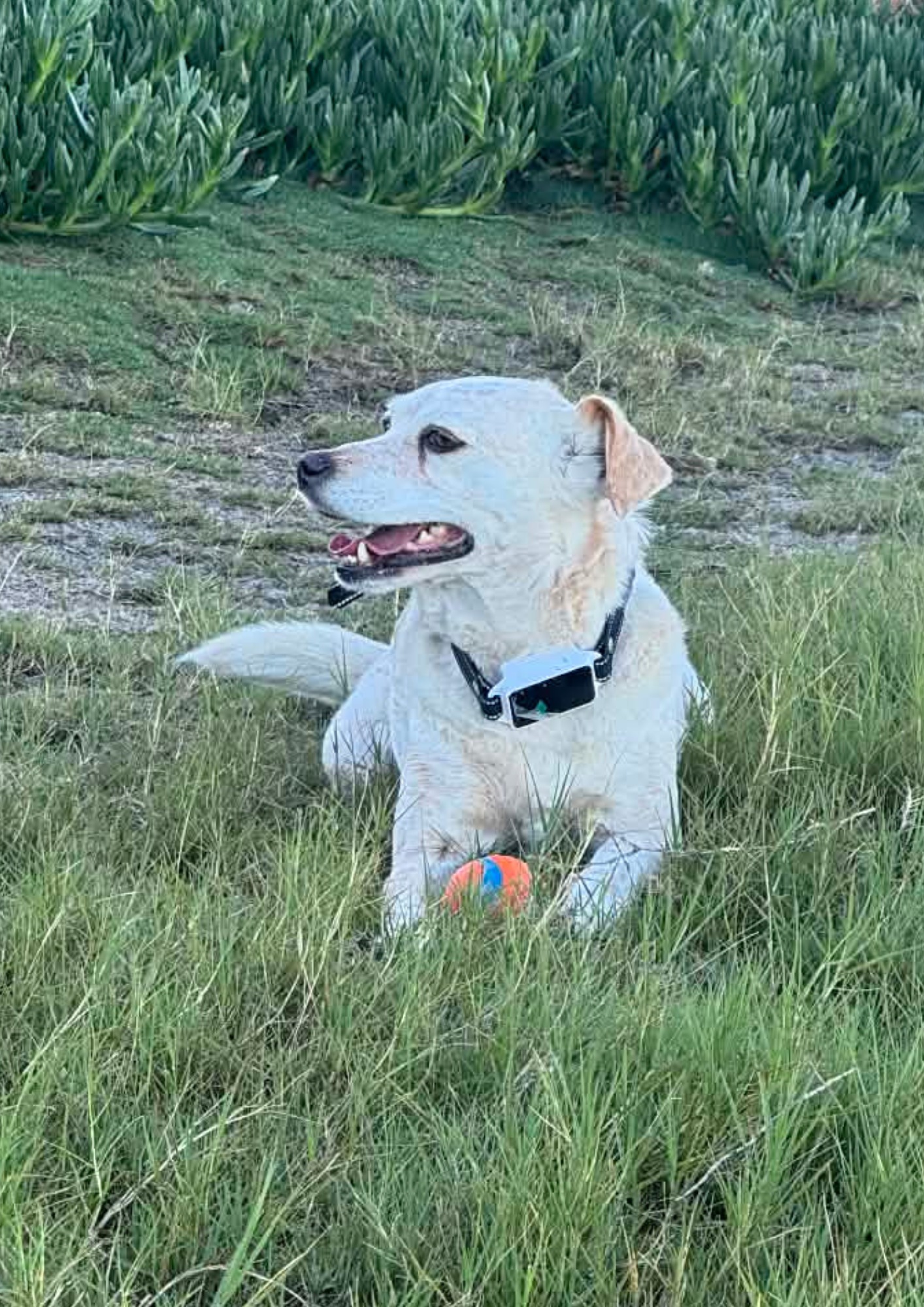
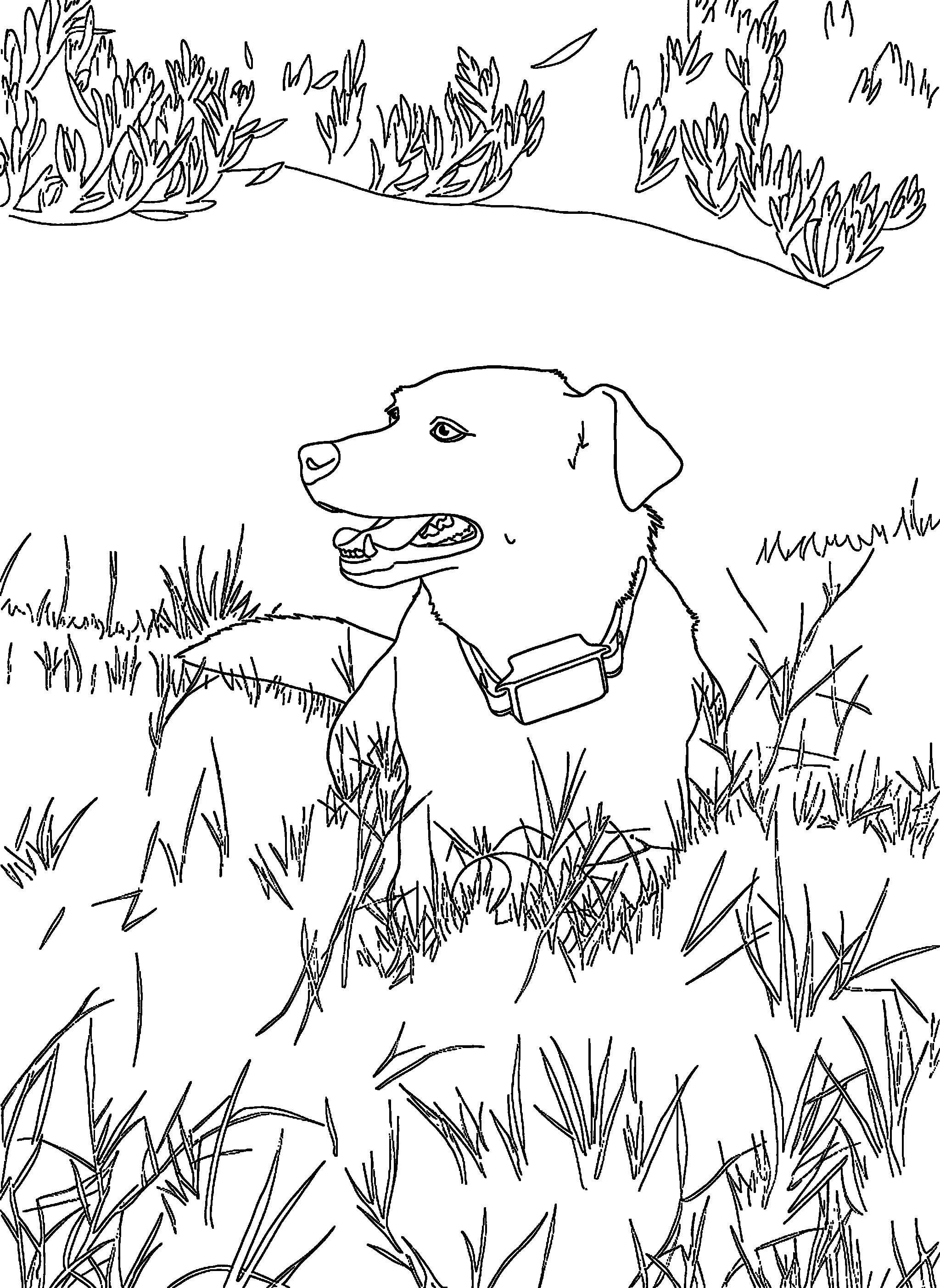
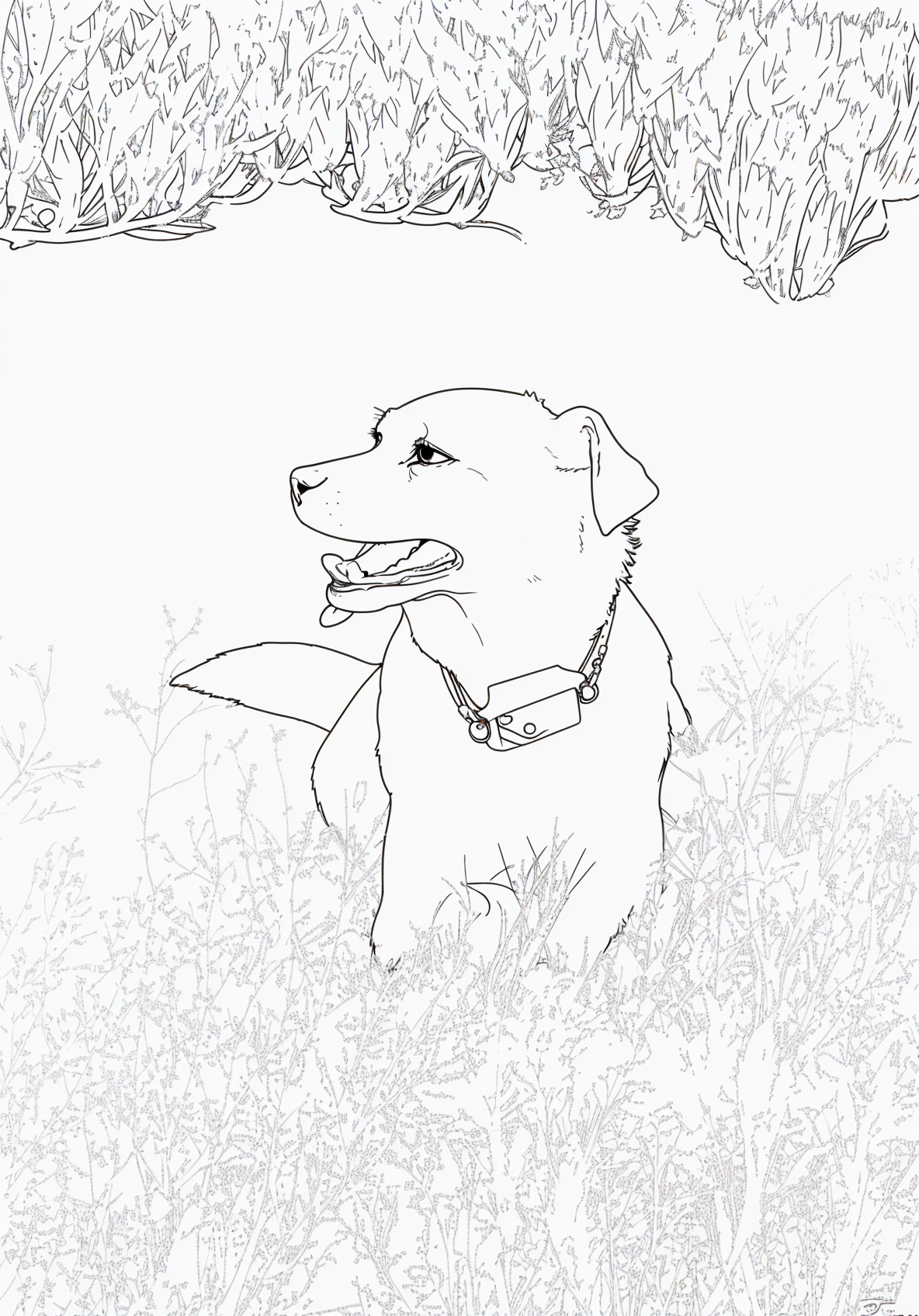
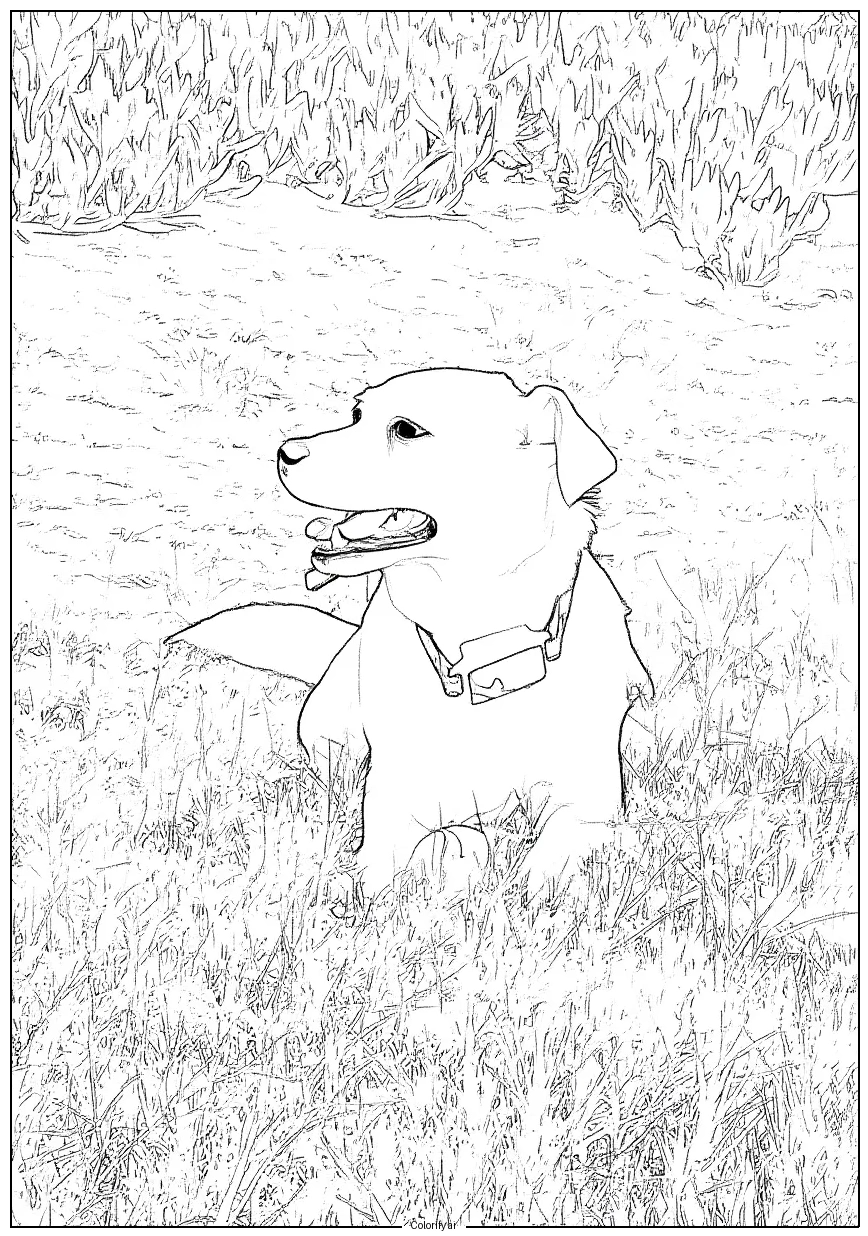
This is the test that ended the debate. Same input photo, five outputs, same dog. The differences are immediate.
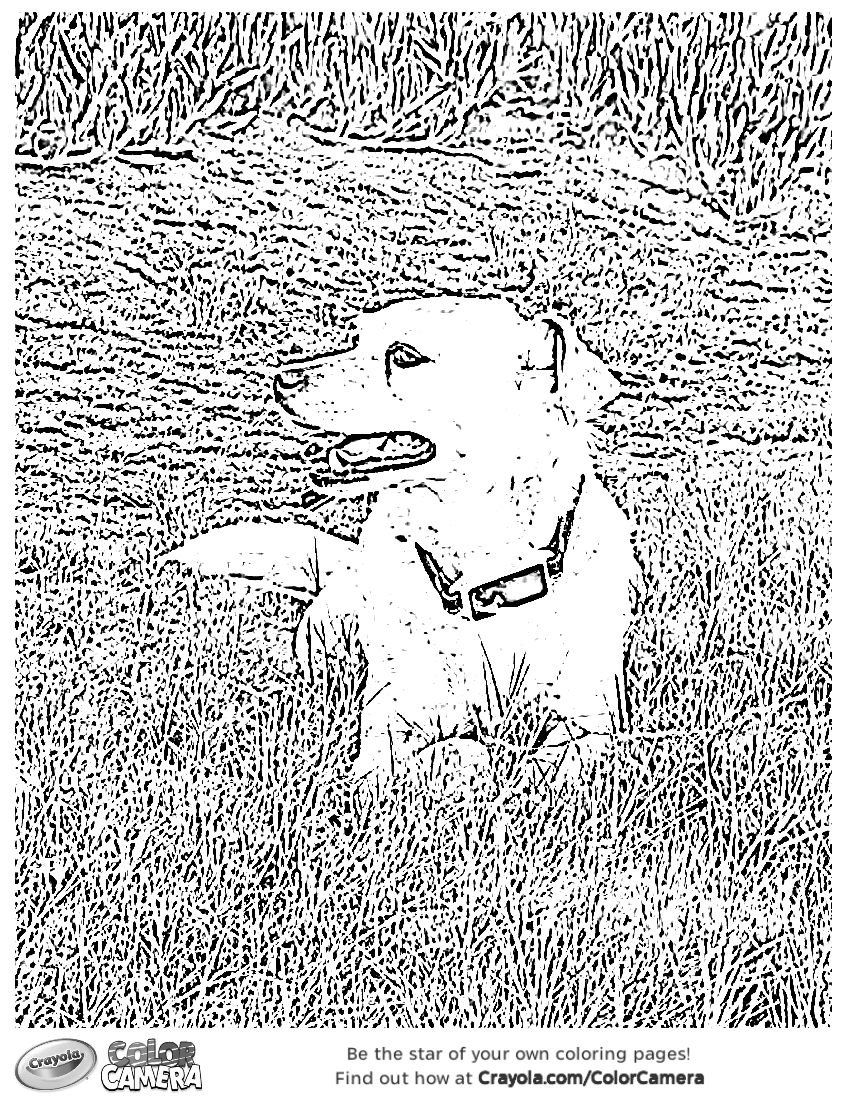
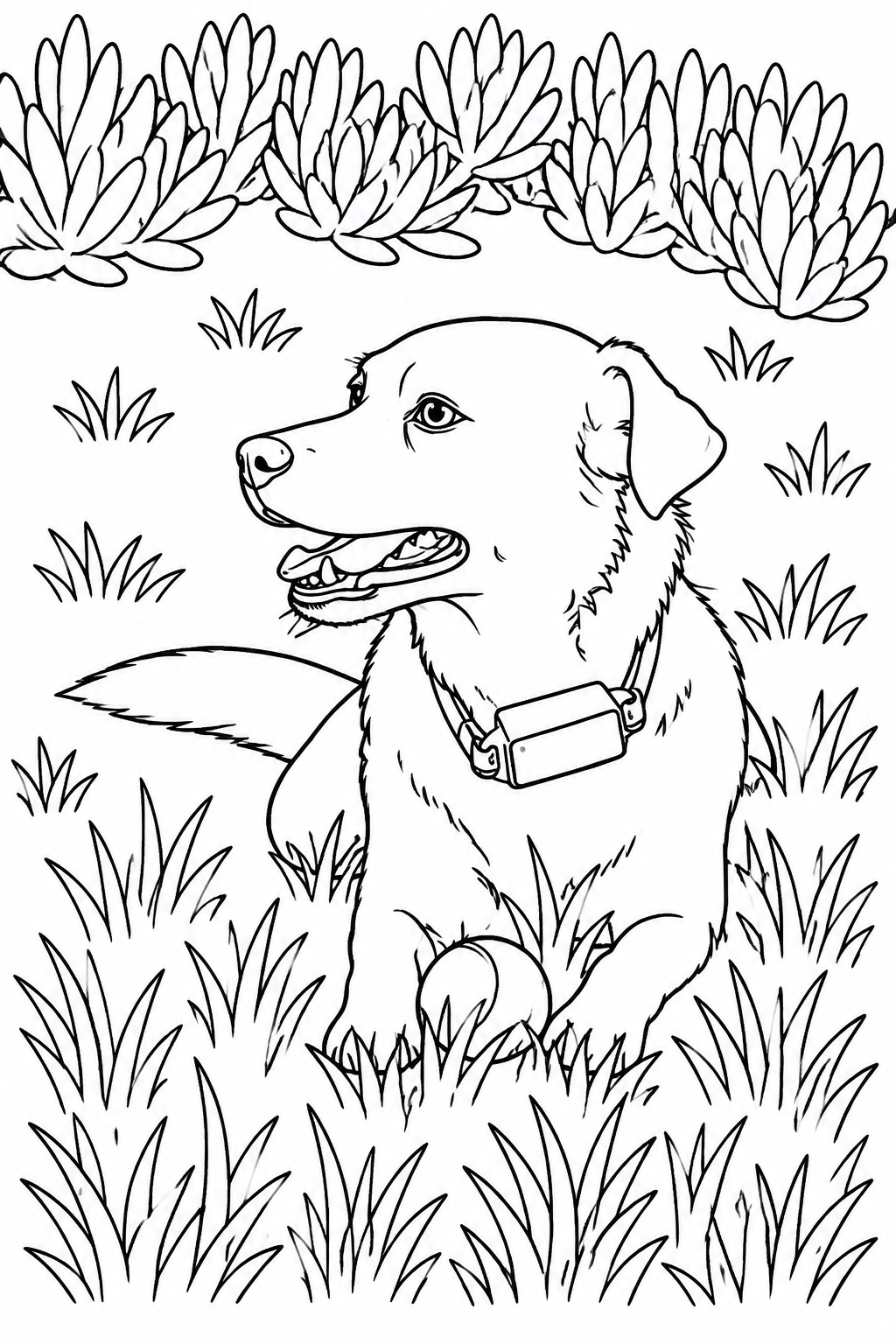
Test photo 1: Apollo (Golden Retriever, mid-tongue-out)
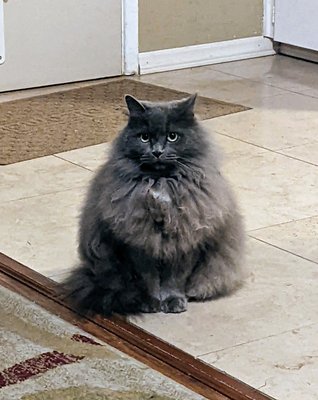
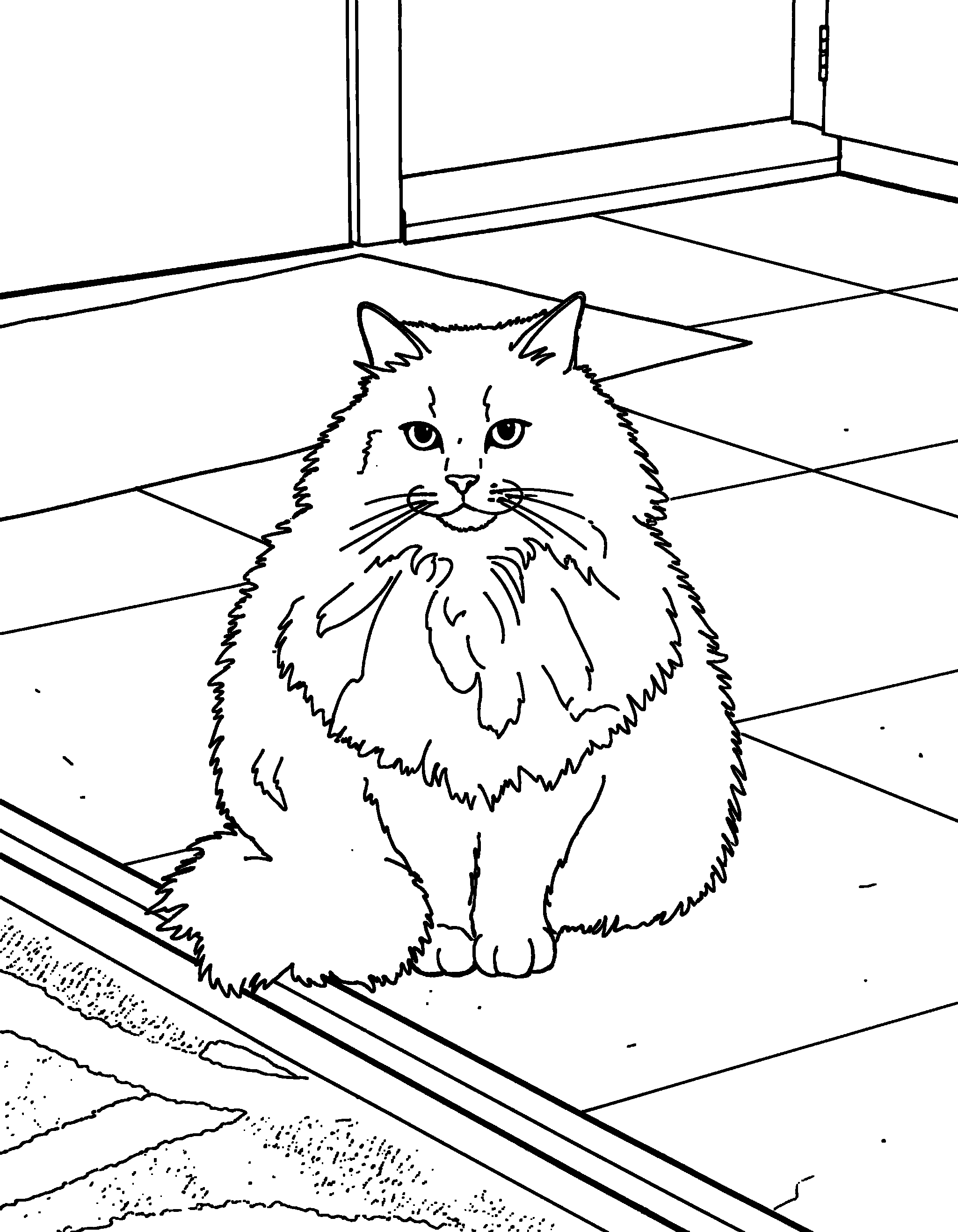
Test photo 2: Kiki (gray cat, loaf position)
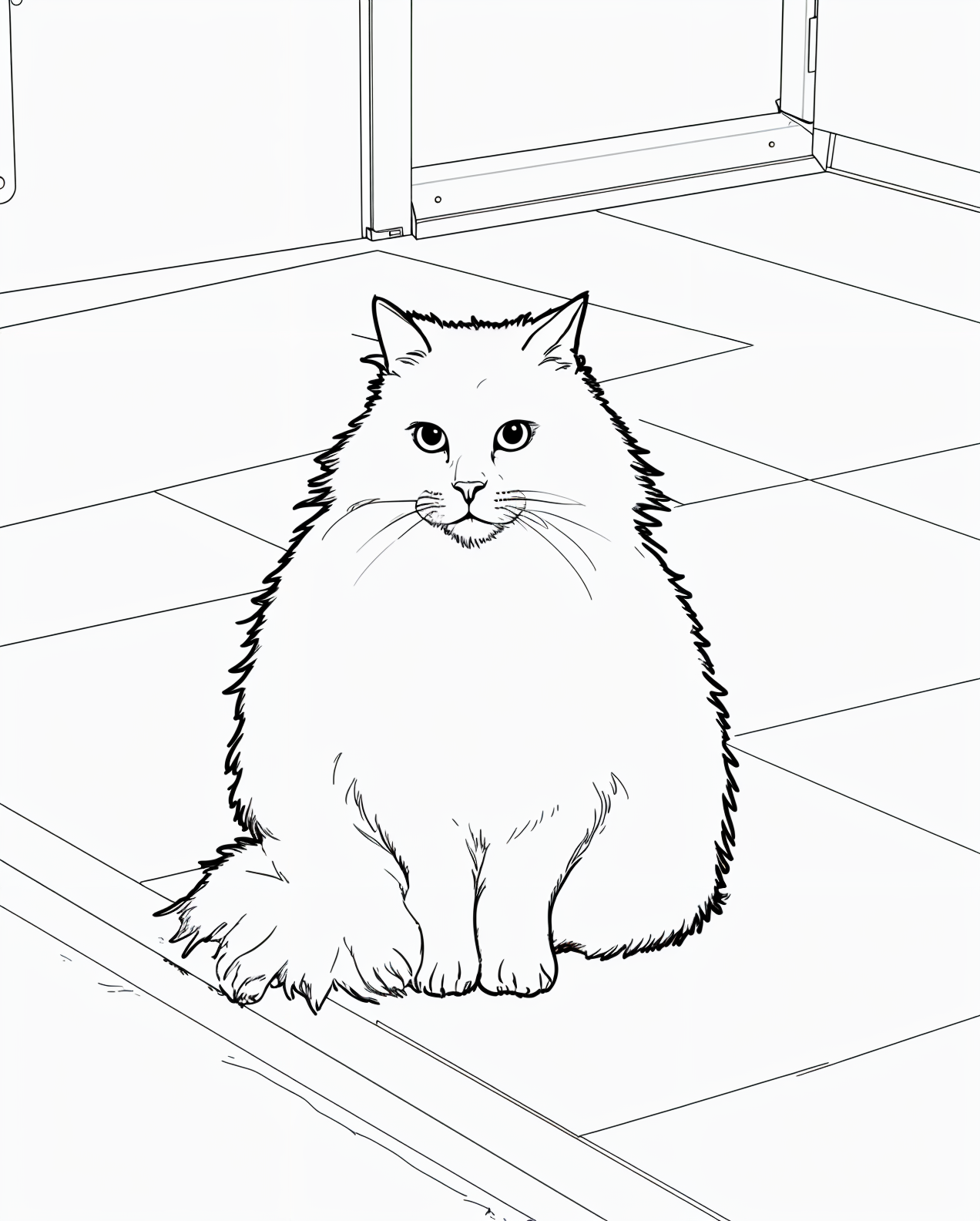
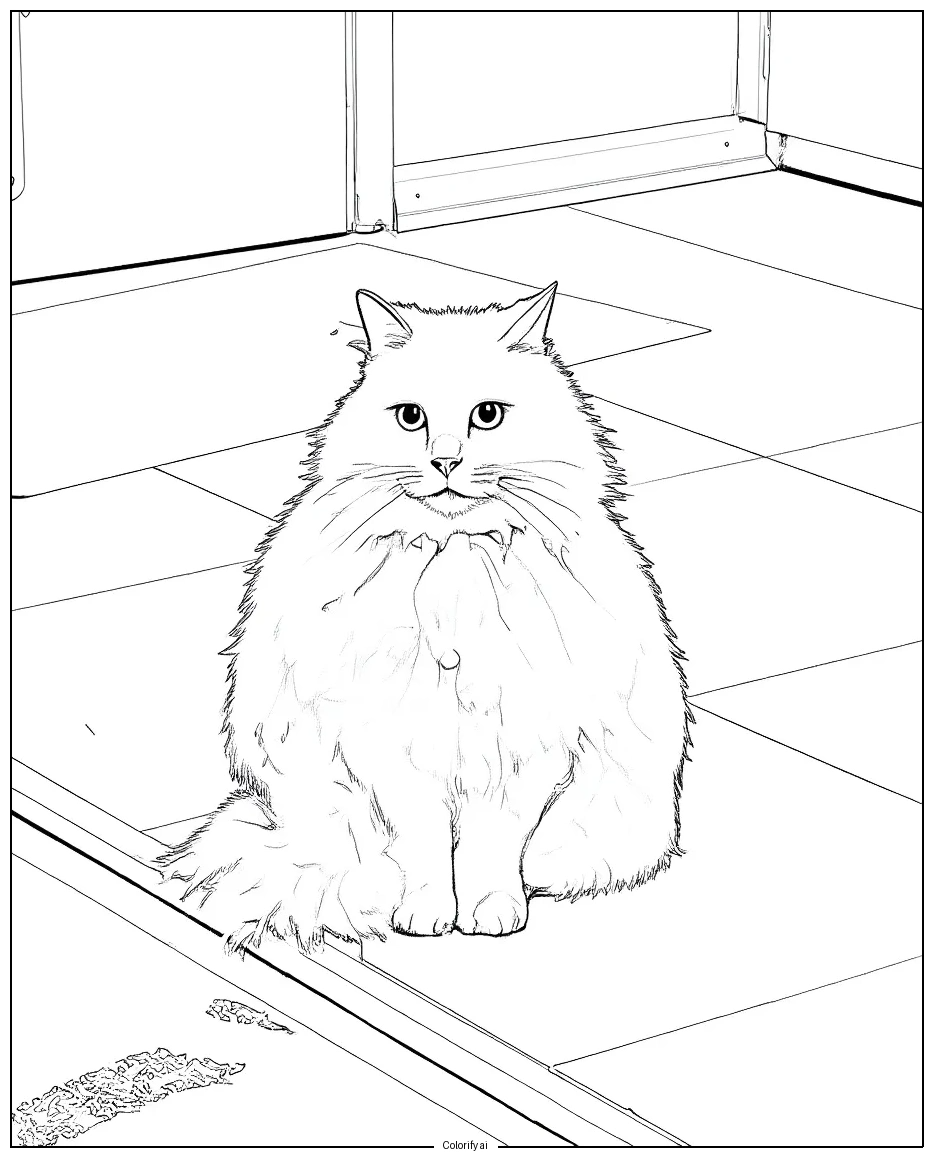
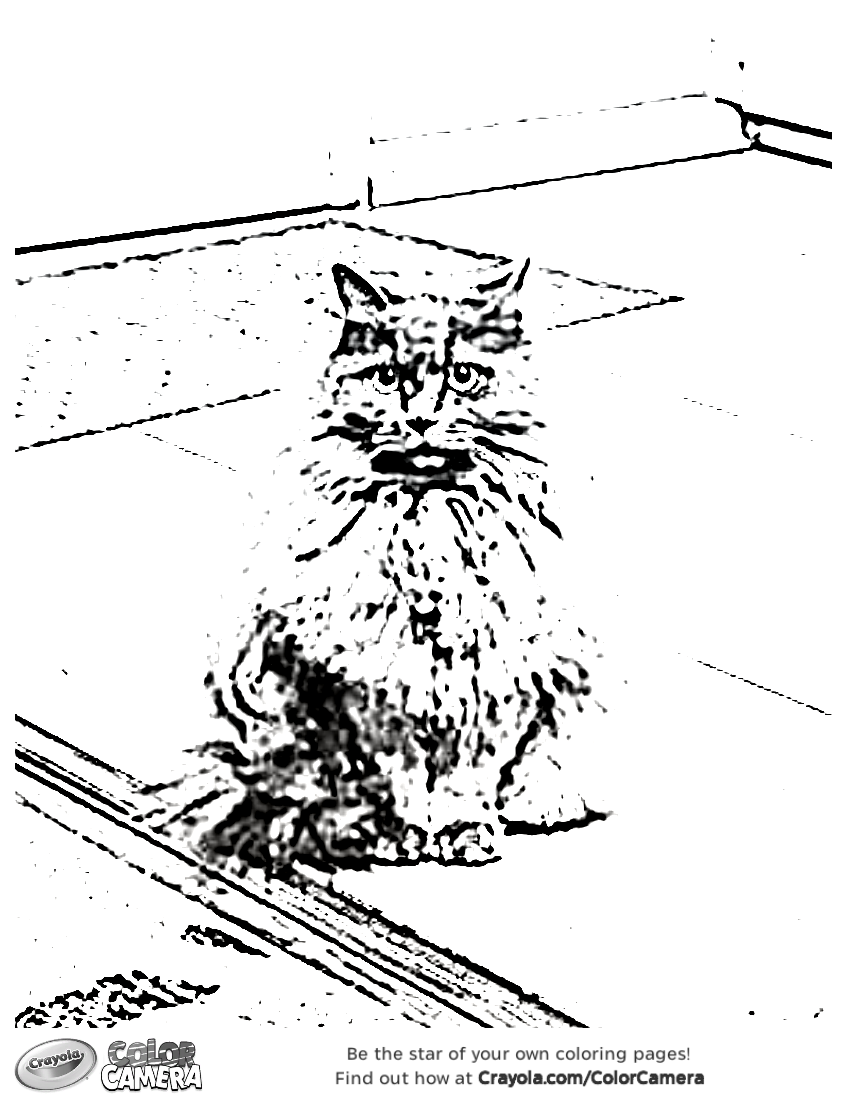
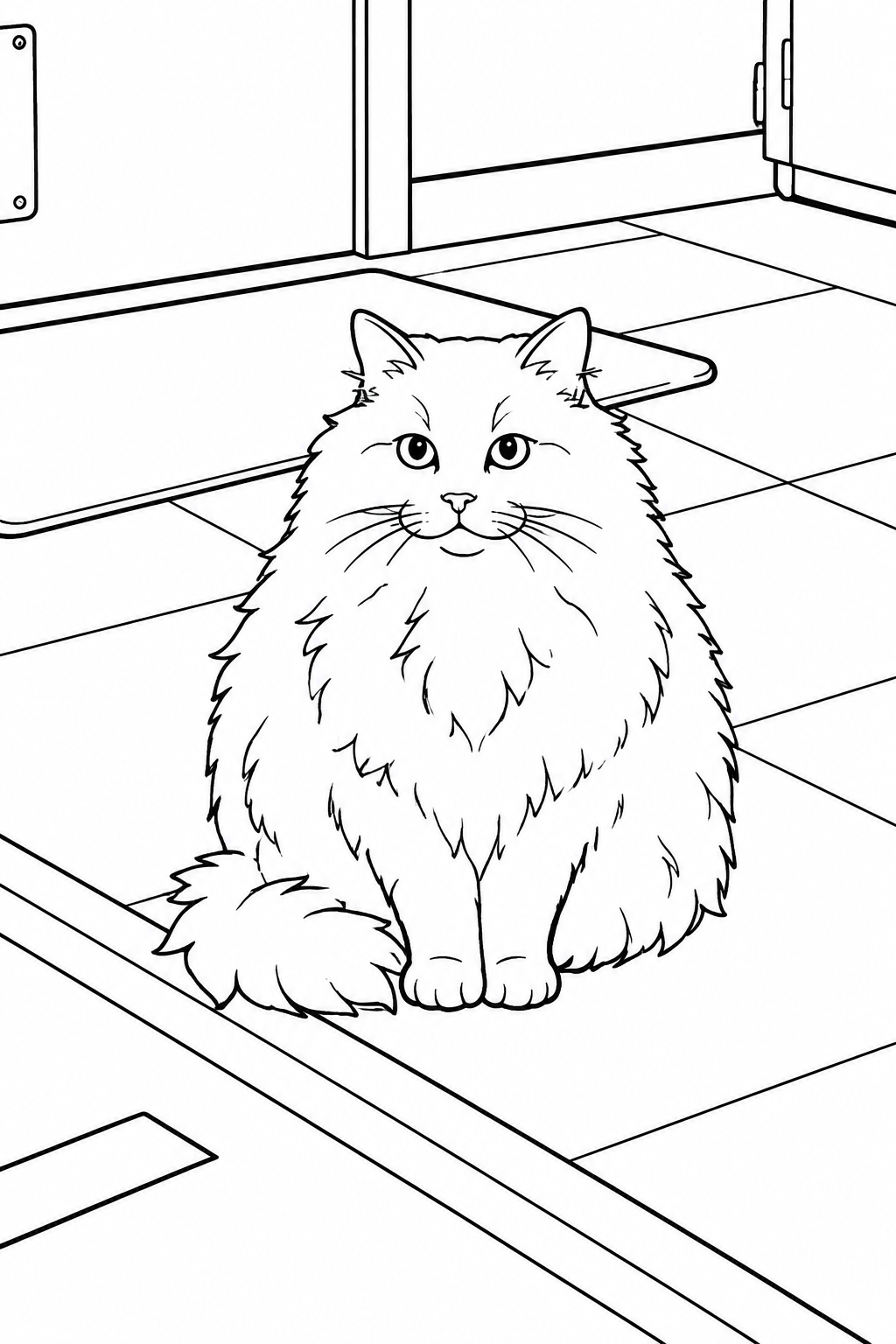
Real outputs from our May 2026 hands-on test. Same input photo per pet, run through each tool using default settings on the free tier where available.
ColorPaw
Best for pet photos · keepsakes · gifts · Made specifically for cats and dogsWhy We Picked It
ColorPaw was the only photo to coloring page tool in our test where the output was unmistakably the pet in the photo. Apollo's mid-tongue-out shot preserved his tongue position, head tilt, the way one ear sits a little lower than the other, and the collar with its tag. Kiki's output went further: full whisker fan, individual fur strokes, the loaf-adjacent silhouette, her focused-but-tired expression, even her paws and the doorframe behind her all rendered cleanly.
Our test data backed up the "recognizably yours" pitch. 92% of testers correctly identified the pet from ColorPaw's outline alone. On the recognition metric alone, ColorifyAI came closest at 68% with strong photo-trace fidelity on dogs and weaker cat results. iColoring.ai followed at 56%, strong on dogs, but its anime stylization of the cat photo dropped the overall average. GenColor.ai landed at 50%, its cartoon stylization reinterprets the photo (Apollo's pose was changed from lying-down to sitting in the render), which is a meaningful identity rearrangement. Crayola Color Camera, the most-recognized name in the coloring category, managed only 48%. ColorPaw wins by a clear margin, especially on cat photos where every other tool produces a generic outline and ColorPaw produces the actual cat.
The user experience is famously frictionless. Two clicks convert your photo to a coloring page: upload, then download. No signup required to try the first page, no email gate, no upsell wall in front of the result. The first page is free. If you want more, the 5-Pack is $7.97 ($1.59 per page) or there's a $6.97/mo plan for 10 pages.
What makes ColorPaw different
ColorPaw is the only tool in this comparison built specifically for pet photos rather than as a general-purpose photo to coloring page converter. The pipeline is tuned on cat and dog imagery, which is why breed-specific features like whisker patterns, fur direction, ear set, and tongue position survive the conversion. Generic AI photo to coloring page tools treat the pet as just another image subject and smooth those features away.
Pros & Cons
- 92% pet recognition rate, the highest in our test
- Detail preservation: 9.5/10. Ear shape, whisker fan, tongue, fur direction all intact
- ~10 seconds from upload to download
- No signup, no email gate, no watermark
- HD print-ready PNG output sized for letter or A4
- Pet-tuned algorithm built specifically for cats and dogs
- Optimized for cats and dogs. Works less well for exotic pets (reptiles, birds, axolotls)
- Free tier is one page; some competitors give unlimited free generations
- No bulk batch upload yet
GenColor.ai
Cleanest cartoon-style line work outside ColorPaw · free · no watermark · bold colorable outlinesWhy We Picked It
GenColor.ai produced the cleanest non-pet-tuned line work in our entire test, and on the objective scorecard it earned the #2 overall spot. Apollo's coloring page kept the sitting pose, the tongue position, the collar with its tag, and the bushes-and- grass setting, all rendered in heavier, bolder "coloring book" line weight than any photo-trace tool managed. Kiki came through as a fluffy long-haired cat on a tile floor with her front-facing pose intact. The lines are confident, the regions are closed, and the page is genuinely usable as a coloring page in a way the pencil-trace tools aren't.
Both outputs averaged around 50% pet recognition and 6.5/10 detail, meaningfully lower than ColorPaw on identity preservation because the cartoon stylization reinterprets the source photo rather than tracing it (Apollo's pose was changed from lying-down to sitting in GenColor's render). The standout number is Colorable Lines: 9.0/10. That's the closest any tool came to ColorPaw on whether the output is structurally a real coloring page, bold continuous outlines, fillable regions, no broken hatching. If you put a GenColor page in front of a kid with crayons, they can actually color it.
The trade-off, and the reason GenColor doesn't take #1, is that it interprets your photo into its own cartoon style rather than tracing it faithfully. Subtle features like exact whisker placement and individual eye expression soften into a stylized rendering. Pose, collar, and setting carry through; fine pet- identity markers do not. So if your priority is "is this output a real coloring page with bold colorable lines," GenColor is excellent. If your priority is "does this look like my specific pet," ColorPaw is still the only pet-tuned answer.
Photo upload is one of several input modes, the homepage features the text-prompt workflow first, which can hide the photo upload entry point. Free to use, no signup required, no watermark, about 15-second turnaround.
Pros & Cons
- 9.0/10 Colorable Lines, the only non-ColorPaw tool that produces a true coloring-book page
- Bold confident outlines that print and color cleanly
- ~50% pet recognition, cartoon stylization reinterprets the photo (pose can shift), so identity-specific markers soften
- Completely free, no signup, no watermark
- ~15-second turnaround
- Cartoon stylization softens fine pet-identity markers (whiskers, individual eye expression)
- Photo upload is hidden behind the prompt-driven workflow on the homepage
- Not pet-tuned, generic illustration model
- Smaller brand presence than ColorifyAI or iColoring.ai (~320/mo brand searches)
ColorifyAI
Best for dog photos rendered as pencil-sketch prints · faithful photo-trace · framed-art use caseWhy We Picked It
ColorifyAI was the strongest photo-trace result on dog photos outside of ColorPaw, and that photo-trace fidelity is what holds the #3 overall spot. Apollo's output preserved his exact pose, the open mouth with tongue out, the collar with its tag, the head tilt, the ear positions, and the bushes-and-grass setting. It even faintly traced the ball in the foreground that every other tool cropped or omitted. The line style is a fine pencil-sketch rather than a bold coloring-book line, which makes for a beautiful finished illustration if your plan is to print and frame.
That same pencil-sketch finish is what kept ColorifyAI out of the top two in our May 2026 re-score. Once we replaced the old "Fridge-Worthy" emotional anchor with the more objective Colorable Lines metric, the pencil-sketch style scored only 5.0/10, many of the line regions are open or hatched with broken light strokes rather than closed outlines, which makes the output hard to fill in with crayons or markers without color bleeding everywhere. GenColor.ai (#2) produces a more usable coloring page from the same photo. It's a gorgeous trace; it isn't really a coloring page in the practical "give to a kid with a box of crayons" sense.
The cat result was meaningfully weaker. Kiki came back as a generic long-haired cat outline with simplified whiskers and the loaf silhouette intact, but most of her individual features flattened. On the recognition test, the tool averaged 68% across both subjects: roughly 82% on Apollo, around 54% on Kiki. Detail preservation came in at 7.5/10, with the dog output carrying the score. That recognition-plus-detail strength is what ranks ColorifyAI ahead of iColoring.ai (#4) on the overall scorecard , iColoring's anime-style cat render loses more identity than ColorifyAI's faded one.
A small "Colorifyai" attribution appears at the bottom of the page on the free tier. It's noticeably less obtrusive than Crayola's watermark, but it is present. Multiple output styles are available on the paid tier, some of which produce bolder lines than the default pencil-sketch.
Pros & Cons
- Strong dog photo recognition (~82%). Best non-ColorPaw result on dog photos
- Faithful photo-trace approach preserves pose, collar, and background
- Pencil-sketch line style is excellent if you want a framed finished piece, not a colored-in coloring page
- Multiple output styles on paid tiers, including bolder line variants
- 4,300 monthly brand searches suggest an established user base
- Lowest Colorable Lines score (5.0/10) of the four non- Crayola tools, pencil-sketch lines are hard to actually color in
- Weak on long-haired cats. Loses whisker patterns and fur direction
- Small "Colorifyai" attribution stamp on the free tier
- Slightly slower processing (~20 seconds)
- Full feature set requires subscription
iColoring.ai
Best for unlimited free use · no signup · no watermark · friction-free workflowWhy We Picked It
iColoring.ai is the most friction-free free photo to coloring page tool in our test, and that's the entire reason it earns a top-three "Best Free Tool" badge in our recommendations even though its scored ranking lands at #4. Unlimited generations, no signup, no payment wall, no watermark. You can run as many photos through it as you want. The interface is clean and modern, and the conversion is quick.
On the recognition test, iColoring.ai scored 56%. Apollo's output rivaled ColorPaw on faithfulness: the collar with the tag, the head tilt, the open-mouth tongue position, and the bushes behind him all preserved in clean line work. Kiki, by contrast, came back in an anime style: front-facing big eyes, simplified fluffy silhouette, basic whisker strokes, and a bare background. The tool seems to apply different style transforms depending on what it reads in the input image. Dogs got a photo-faithful render; the cat got a stylized one. That cat-stylization is the specific reason iColoring sits below ColorifyAI on the scorecard , the anime transform loses more of Kiki's identity than ColorifyAI's faded pencil-trace did.
Detail preservation lands at 6.0/10. Colorable Lines comes in at 7.0/10, meaningfully better than ColorifyAI's pencil- sketch finish, because iColoring's lines, while lighter than ColorPaw's and GenColor's, still form closed fillable regions rather than fading into the page.
Pros & Cons
- Completely free, no signup, no limits, no watermark
- Strong dog photo render, Apollo result rivaled ColorPaw on pose and collar fidelity
- Better Colorable Lines (7.0/10) than ColorifyAI's pencil-sketch
- Clean modern interface, ~15-second turnaround
- Works on a wide variety of subjects beyond pets
- Stylization varies by subject. Cats often come back in anime style, losing identity
- 56% overall recognition, dragged down by the cat result
- Light line weight is less bold than ColorPaw's or GenColor's confident strokes
- No HD download option on the free tier
- Not tuned for animals specifically; generic AI photo to coloring page generator
Crayola Color Camera
Most recognized brand · photo-traced · permanent watermarkWhy We Picked It
Crayola Color Camera (at crayola.com/ColorCamera) carries the strongest brand recognition in the entire photo to coloring page category. Crayola has been the kid-safe coloring authority for over a century, and the Color Camera tool ranks #1 organically on Google for the head term with over 12,000 monthly visits from this query alone. We had to test it.
The output, unfortunately, did not match the brand pedigree. Color Camera runs a photo-trace pipeline that converts the source image into a high-contrast stippled rendering. Every blade of grass, every shadow, every floor tile gets traced as a black speckle. The pet's silhouette is visible only as the lightest area in a field of photographic noise. Apollo's coloring page kept his pose and tongue position legible through the noise; Kiki almost disappeared into the background stippling. On the recognition test, Crayola averaged 48%, the lowest of the five tools. Detail preservation came in at 4.5/10, the pet's identifying features are technically still there in the stipple, but you have to look hard. The output looks more like a bad fax of the photo than a coloring page derived from it.
Once we re-scored with the new Colorable Lines metric, Crayola's situation got worse, not better. Color Camera scored just 1.0/10 on Colorable Lines because the output isn't really a coloring page in the structural sense, it's a stippled photocopy with no closed regions, no continuous outlines, and no usable white space. There's nothing on the page for a crayon to actually fill in. The lowest overall composite score in our test (3.5/10) is the result.
Every Color Camera output also carries a permanent "Crayola Color Camera" watermark across the bottom. That's awkward if you wanted the page as a keepsake or a framed gift, fine if you only intend to use it as a one-off activity sheet. Even Crayola, with the most recognized name in the coloring category, can't preserve a pet's identity the way a pet-tuned tool like ColorPaw can.
Pros & Cons
- Strongest brand recognition in the category
- Completely free with no signup
- ~12-second turnaround
- Kid-safe, family-trusted brand experience
- Output is dominated by photographic noise. Pet barely visible in the background stippling
- 48% pet recognition, the lowest in our test
- 4.5/10 detail preservation. Functions more as a photo filter than a coloring page
- 1.0/10 on Colorable Lines, no closed regions to actually fill in
- Permanent "Crayola Color Camera" watermark on every page
- Not pet-tuned. Background is traced as densely as the pet
What should you look for in a photo to coloring page tool?
If you're choosing a tool yourself rather than taking our recommendation, here's what actually matters in our experience:
Photo upload (real, not just templated)
This is the biggest single dividing line in the category. Some tools labeled "custom coloring pages" only let you customize pre-made templates. Others, like Crayola's Color Camera, accept real uploads but watermark every output. The cleanest tools (ColorPaw, GenColor.ai, iColoring.ai, ColorifyAI) accept real photo uploads with no permanent branding stamped on the page.
Detail and feature preservation
Generic image-to-line-art tools tend to smooth out the details that make your subject recognizable. For pets, that means losing breed-specific features. Ear shape, fur direction, whisker placement. The whole point of using your own photo is to capture what makes the subject unique. A tool that erases that detail defeats the purpose.
Output resolution and print readiness
Look for tools that produce HD PNG (or PDF) output sized for standard letter or A4 paper. Lower resolutions look fine on screen but pixelate when printed. If the tool's output looks blurry at 100% zoom, it'll look worse on paper.
Friction-free trial
The best tools let you see a result before they ask for an email or payment. If the workflow is "sign up, then see what you'd get," be skeptical. Tools confident in their output let you try first.
Price transparency
Watch for monthly subscriptions hidden behind "free trial" buttons. The cleanest pricing models in this category are one-time packs (ColorPaw 5-Pack at $7.97 is a good benchmark) or genuinely free tools (iColoring.ai). Subscription-only models for occasional-use products usually mean someone forgets to cancel.
Tip from testing: The single biggest factor in output quality across every tool we tried was the input photo. Bright, in-focus, subject-facing-camera photos produced better results across the board, even from the weaker tools. Your phone's regular camera in good window light beats a professional photo in a dim room.
What's the difference between AI photo-to-coloring tools and template-based tools?
One of the first decisions to make in this category is whether you want a tool that transforms your photo or a tool that customizes a pre-made template. They're often labeled the same way ("custom coloring pages"), but they serve different intents.
AI photo to coloring page tools (ColorPaw, ColorifyAI, iColoring.ai, GenColor.ai) take the image you upload and generate a unique outline from it. The output is one-of-a-kind because no two photos are identical. The pet's actual features carry through to the page.
Photo-trace tools (Crayola Color Camera) convert your photo into a coloring page by tracing the source image's edges directly. This sounds similar to AI conversion, but the result is closer to a black-and-white photocopy than a stylized coloring page. Every background detail traces alongside the subject, which is why Crayola's output looked busy and noisy in our test.
Template-based tools (Canva's coloring page templates, most printable-pack sites) start from a designer-drawn illustration. You can recolor, add stickers, or rearrange elements, but the line art itself is fixed. Two people using the same template get nearly the same coloring page.
If your goal is a keepsake of your specific pet, kid, or moment, you need photo-to-coloring AI. If your goal is a fun activity sheet that doesn't need to look like anyone in particular, templates are faster and cheaper.
What makes a photo coloring page actually look like your pet?
"Recognizable" is the make-or-break property in this category, but not every tool that claims it actually delivers. Here's what we look for when scoring detail preservation, in order of importance:
- Distinctive feature shape. Ear position (one up, one flopped), tongue position, eye expression. These are what make a pet identifiable in seconds. Tools that smooth these into "generic dog ears" lose the recognition test immediately.
- Fur direction and texture. A long-haired cat has fur that flows in specific directions. Generic AI tools render this as evenly-distributed fluff, which makes every cat look the same. Pet-tuned tools preserve the directional detail.
- Whisker placement. Cat owners spot this instantly. Cats have distinctive whisker patterns that sit slightly differently on every face.
- Posture and silhouette. A cat in a loaf is a different shape than a cat stretched out. The output should preserve the pose, not normalize it.
- Background context. The best tools either keep contextual elements (a favorite toy, a familiar piece of furniture) or remove the background cleanly. The worst tools render the background as random scribbles.
If a tool scores well on the first three points, the output will pass the "recognizable from the outline alone" test. If it fails any of them, the output will look like a generic version of the subject.
Frequently asked questions
What's the best photo to coloring page converter?
Can I turn a photo into a coloring page for free?
Which tool works best for pet photos specifically?
Does Crayola have a photo to coloring page tool?
How do I take a good photo for a coloring page?
Are these photo-to-coloring tools good for kids?
Is it safe to upload my pet's photo to these tools?
Do these photo to coloring page tools work on a phone?
What file format do photo to coloring pages come in?
Want to see the line work before you upload anything? Our free printable sets show the same style on real pages: dog coloring pages, cat coloring pages, Christmas coloring pages, and Thanksgiving coloring pages. And if you are making a portrait as a gift, our pet memorial gifts and gifts for dog lovers guides show where a custom page fits.
Which photo to coloring page tool should you actually use?
If you have a cat or dog you want recognizable on the page: ColorPaw (#1). 92% recognition, 9.0/10 detail, 9.5/10 Colorable Lines, no watermark, no signup to try.
If you want the best non-pet-tuned coloring-book line work: GenColor.ai (#2). Cartoon stylization softens fine identity markers, but the lines themselves are the closest any non- ColorPaw tool gets to a true coloring page. Free, no watermark.
If you have a dog photo and want a pencil-sketch finish to frame: ColorifyAI (#3). Strong on dogs (~82% recognition), weak on long- haired cats. Faithful photo-trace approach, beautiful as a print, harder to actually color in.
If you want unlimited free generations with no signup: iColoring.ai (#4). Strong on dogs, applies an anime style to some cat photos. The fastest friction-free free option.
If you want the most-recognized name in coloring: Crayola Color Camera (#5). Crayola's brand authority is real, but the Color Camera output ranks last on every quality metric we measured, and only 1.0/10 on Colorable Lines.
📸 Try ColorPaw free →